

Okay, real talk. If you code with AI right now, you probably have one assistant going at a time. You ask it something, you wait, you check what it did, you ask the next thing. It’s great! It’s also kind of like having one really fast employee and making them do every single job in a line.
That’s the whole reason Hunter built R7 Orbit.
So what is it?
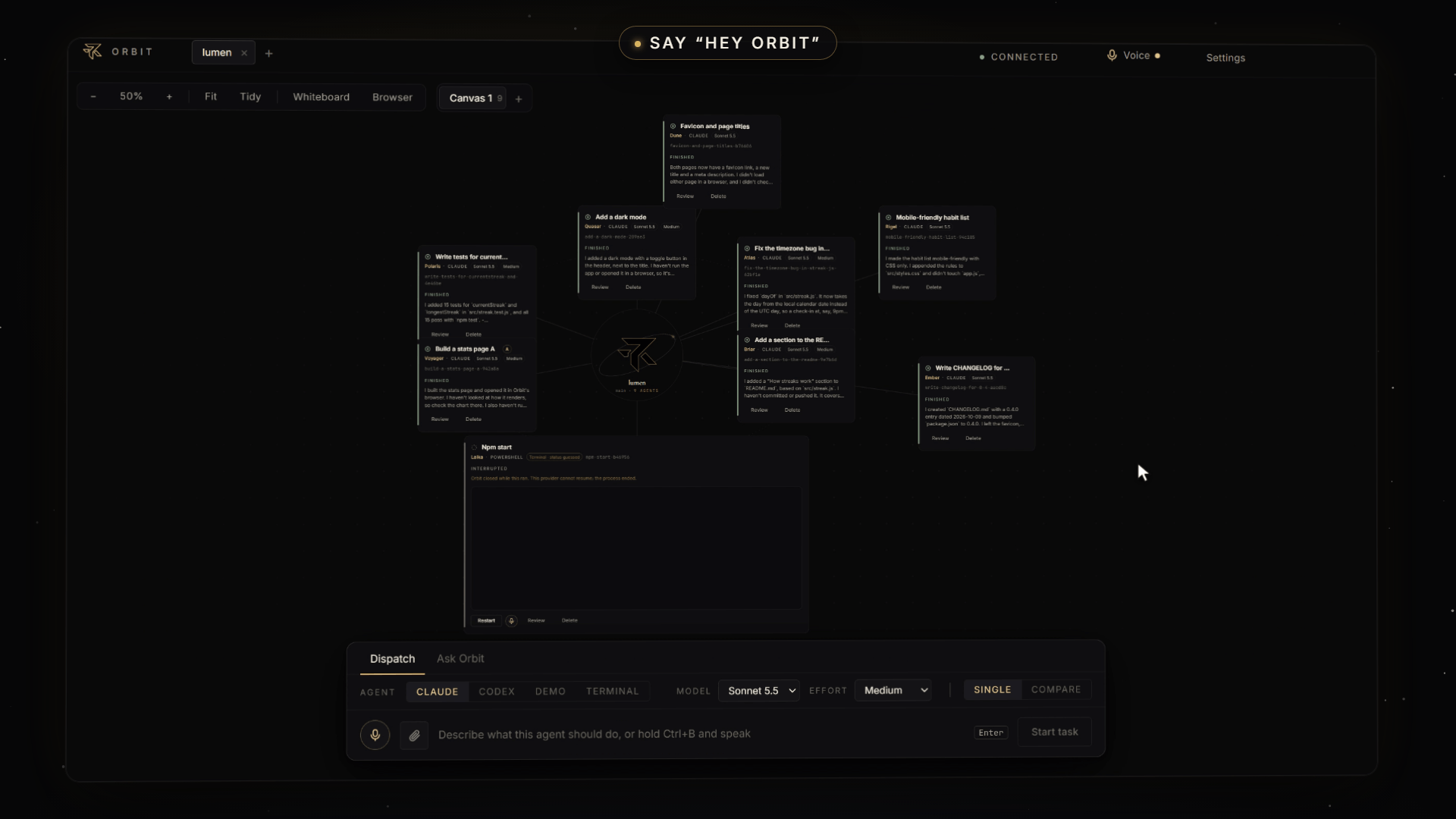
R7 Orbit is a desktop app that’s basically mission control for your AI coders. You hand out jobs, they all work at the same time, and nobody trips over anybody.
Every task gets its own agent (they even get little names, like Quasar, Atlas and Polaris, so you can tell them apart), and every agent works in its own copy of your project. So five agents can be changing five different things at once and none of them breaks the others’ stuff. Your real project stays untouched until the work is done.

lumen
Add a dark mode
QuasarClaude
Favicon and page titles
DuneClaude
Mobile-friendly habit list
RigelClaude
Fix the timezone bug in…
AtlasClaude
Write CHANGELOG for…
EmberClaude
Add a section to the RE…
BriarClaude
Build a stats page A
VoyagerClaude
Write tests for current…
PolarisClaude
Everything happens on one big canvas with your project sitting in the middle, and a little gold dot orbiting the logo. It speeds up when agents are busy and pulses when one of them needs you. (Yes, we’re a little proud of the dot.)
Just type what you want
Seriously, that’s it. There’s a box at the bottom. You type something like “add a dark mode with a toggle in the header, and remember the choice,” hit enter, and a card pops onto the canvas with an agent already on it.
Add a dark mode
QuasarClaudeSonnet 5.5Medium
Finished
I added a dark mode with a toggle button in the header, next to the title. I haven't run the app or opened it in a browser, so it's…
Need more done? Send more. In the demo we fired off a timezone bug fix, a batch of tests and a README update back to back, and they all ran side by side.
Fix the timezone bug in…
AtlasClaudeSonnet 5.5Medium
Finished
I fixed
dayOfinsrc/streak.js. It now takes the day from the local calendar date instead of the UTC day, so a check-in at, say, 9pm…Write tests for current…
PolarisClaudeSonnet 5.5Medium
Finished
I added 15 tests for
currentStreakandlongestStreakinsrc/streak.test.js, and all 15 pass withnpm test.Add a section to the RE…
BriarClaudeSonnet 5.5Medium
Finished
I added a "How streaks work" section to
README.md, based onsrc/streak.js. I haven't committed or pushed it. It covers…
They don’t go rogue
This is the part people always ask about. If an agent wants to do something big, like run a command on your computer, it stops and asks you first. The card glows gold and says Needs you, and you hit Allow or Deny right there on the card.
You decide how much rope to give them. Let them edit files freely and still ask about commands, or loosen things up once you trust them.
Curious what it’s up to? Click in.
Every card opens into a full conversation with that agent: what you asked, what it said, how long it worked, and every step it took if you want the nerdy details. One more click gets you the Changes tab, with every line it added or removed.
You can also keep talking to it, change the model or effort between messages, or hit Stop (and Stop actually stops everything it started).
Claude or Codex? Run both.
Can’t decide which AI is better for a job? Don’t decide. Flip on Compare, type the prompt once, and Orbit runs Claude and Codex on the same task side by side.
When they’re done you get a comparison view: how long each took, what it cost, what each one changed, and a “highlight differences” button. Keep the winner and you’re done.
It’s got its own browser
When an agent builds something, you don’t have to go open Chrome. Orbit has a browser built right in. In the video, the agent built a stats page with a little weekly chart and opened it in Orbit’s browser by itself.
Build a stats page A
VoyagerClaudeSonnet 5.5Medium
Finished
I built the stats page and opened it in Orbit's browser. I haven't looked at how it renders, so check the chart there.
You can flip it between desktop, tablet and phone widths, open normal websites in web tabs, and if you start a dev server in one of Orbit’s terminals, the browser just pops open with your app running. Real terminals too, by the way: PowerShell, Claude Code, Codex CLI, whatever you like, each in its own safe copy of the project.
Or skip all that. Give Orbit a goal.
This one’s my favorite. There’s an assistant called Ask Orbit, and in Coordinate mode you just give it a goal.
We typed “Get Lumen ready for launch: add a favicon and proper page titles, make the habit list work well on phones, and write a changelog.” Ask Orbit read through the project, came back with a plan of three agents, we hit Approve once, and it launched all three.
Favicon and page titles
DuneClaudeSonnet 5.5
Finished
Both pages now have a favicon link, a new title and a meta description. I didn't load either page in a browser…
Mobile-friendly habit list
RigelClaudeSonnet 5.5
Finished
I made the habit list mobile-friendly with CSS only. I appended the rules to
src/styles.cssand didn't touchapp.js…Write CHANGELOG for…
EmberClaudeSonnet 5.5
Finished
I created
CHANGELOG.mdwith a 0.4.0 entry dated 2026-10-09 and bumpedpackage.jsonto 0.4.0.
It’ll even sketch things out on a whiteboard. We asked it to draw how a check-in turns into a streak, and it drew the whole flow, color-coded boxes and arrows and all.
And yeah… you can just talk to it
Turn on “Hey Orbit” and you can talk to it hands-free, even while it’s minimized behind other windows.
In the video we said, “Hey Orbit… start a task to add a weekly summary email… that’s it.” A gold glow lit up around the window, the words showed up as we spoke, and a new agent started working. The speech-to-text runs on your own computer, so nothing you say gets sent anywhere. There’s a mute shortcut for calls too.
When the work’s done, it merges itself
Finished work goes into your project automatically. If two agents happened to touch the same lines, the one that finished second gets asked to sort it out. Every card tells you plainly where its work is: still in its own copy, in your project, or up on GitHub.
Then one click on the GitHub button and it’s pushed.
Too many cards? Organize the chaos.
Shift-click a few cards and hit Ctrl+G to group them into a section. Fold the section down to a tiny chip (anything that needs you still shows on the chip, so you never miss a question). Minimize cards into little tabs, spin up extra canvases, or keep several projects open in tabs at once.
Feeling brave?
There’s a Bypass all permissions switch. Flip it and the agents stop asking about anything. They just go.
It’s clearly labeled as dangerous, and it should be. But if you’re in a throwaway project and you want maximum speed, it’s there.
Make it yours
- Usage: Settings shows exactly what your agents have cost, broken down by day, model and project. (Our entire demo, every agent in the video included, came to about a dollar and a quarter on Sonnet 5.5.)
- Wallpaper: put a picture behind the canvas. The moon horizon comes with it, and you can add your own.
- Sounds: a chime when an agent finishes, a bell when one needs you.
- Voices: 14 natural voices that can read answers back to you, all running locally.
There’s also a Storage page that cleans up after finished tasks, step-by-step guides for the setup stuff, and patch notes for every version so you can see what’s new.
The whole thing, in one sentence
R7 Orbit lets you hand out coding jobs to a whole team of AI agents, watch them all work at once, and keep only what you like. All on one screen.
Your whole AI team. One screen. That’s R7 Orbit.
Everything in this post (and the video) is the real app running real agents on a real little demo project, a habit tracker called Lumen. No mockups.