 R7 Orbit



An agent in R7 Orbit can change code, run commands on Hunter’s computer and publish to GitHub. Orbit is built so Hunter decides which of those happen. This second post in the series covers the permission question on each agent’s card, what an agent may do without asking, and why agents never hold his GitHub login. Part 1 covers why Orbit exists and what its first day built.
The question on the card
A permission question is an agent stopping to ask before it does something with consequences, like running a command. In Orbit, the question shows up on the agent’s own card: the card says Needs you, names the tool the agent wants to use and shows exactly what it would run. Hunter answers right there, with Allow once, Deny, or Allow commands for this task.
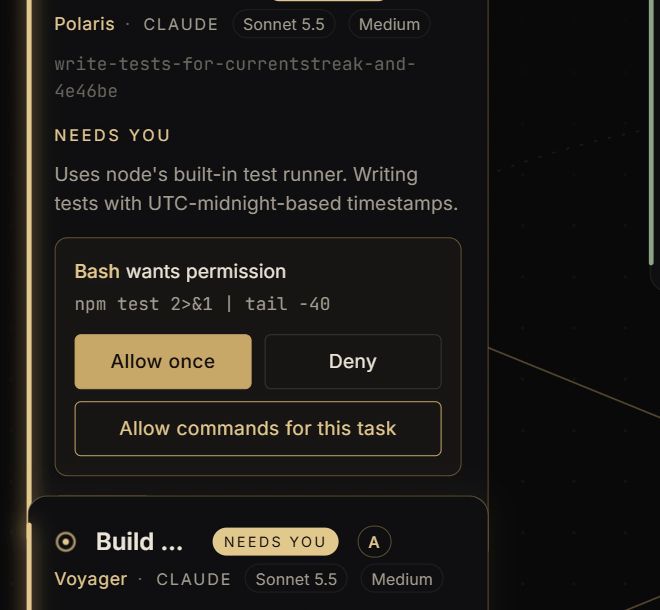
So a question never goes unseen, the card glows and a bell rings. If nobody answers, the bell rings again every five minutes until someone does.
Saying no sticks, too. When Hunter denies a request, the agent is told plainly not to try again, and the same request is refused for him if it comes back. After three refusals in a row the agent’s turn stops, so he can tell it what he wants instead.
What an agent may do without asking
Answering every question gets slow, so Orbit lets Hunter decide ahead of time. Settings has three kinds of action an agent can be trusted with, each set to Ask me or Just do it:
- Create and edit files inside the task’s own folder. This is the safe one. The agent works in its own copy of the project, and everything is reviewed before it reaches Hunter’s branch.
- Read files anywhere on this computer. Marked not recommended, because the agent could read keys and passwords, and what it reads is sent to the AI service.
- Run commands. Also not recommended, because a command can do anything Hunter can do on his computer.
Everything starts on Ask me. Reading and commands can also be allowed for just one task, straight from the question on its card.
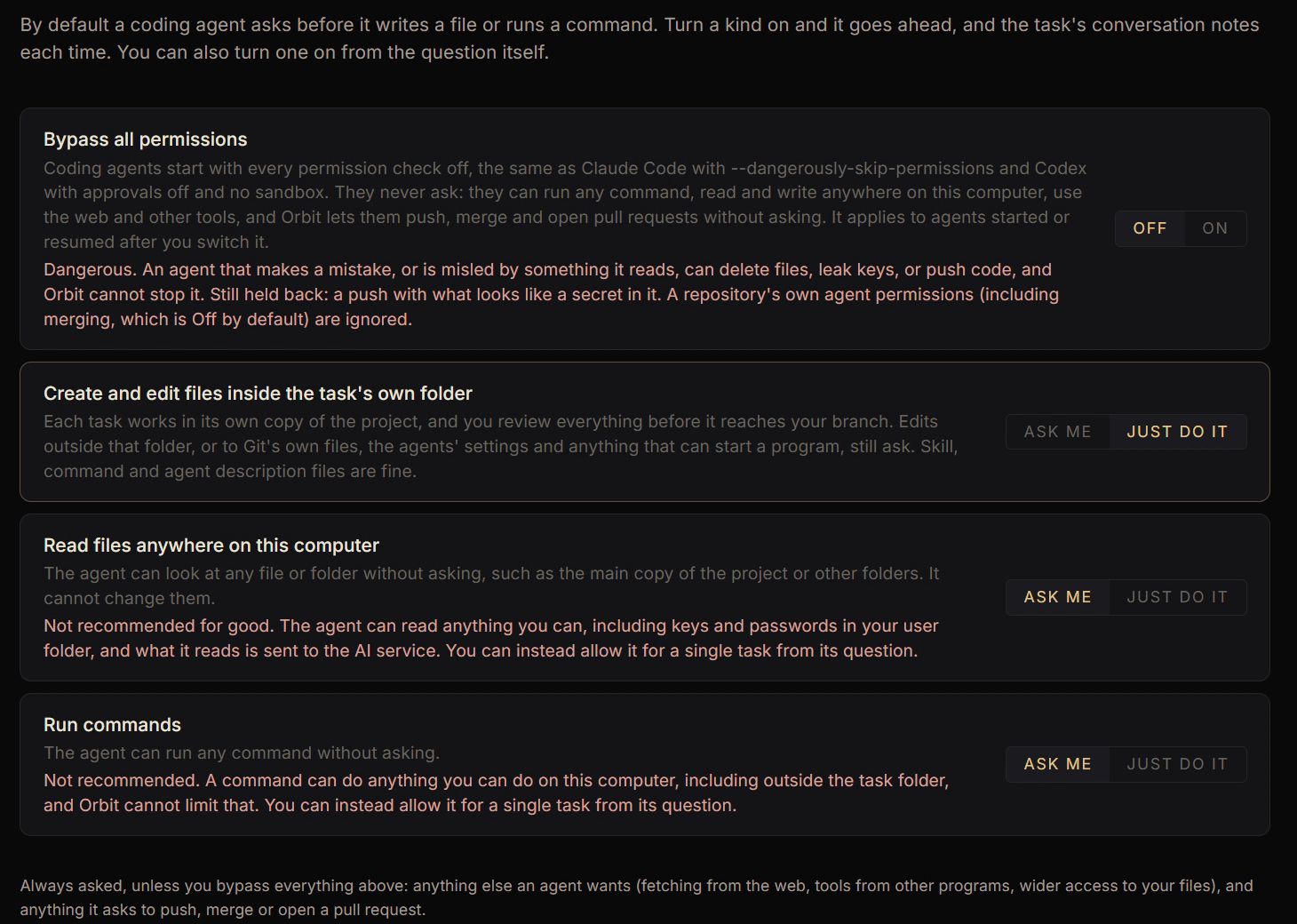
A few things always ask unless everything is bypassed (more on that next): changes to Git’s own files or the agents’ settings, fetching from the web, tools from other programs, and anything to do with pushing or merging.
There’s also a Bypass all permissions switch at the top of that page. Turn it on and agents never ask about anything, the same as running Claude Code or Codex with every check switched off. It’s off by default, and the warning under it is in red. Even with it on, Orbit still blocks a push that looks like it contains a password or key.
Agents never hold the GitHub login
GitHub is where Hunter’s code lives online, and a token is the password-like key that lets a program push code there. Orbit keeps that token itself, encrypted on Hunter’s computer, and never hands it to an agent.
Every agent starts with GitHub logins stripped out of its surroundings: no token, no SSH key (another kind of login), and GitHub’s own command-line tool finds nobody signed in. An agent that wants to publish has to use Orbit’s tools for it: push its branch, open a pull request (a proposed change on GitHub), or merge one. For each project, Hunter sets each of those to Off, Ask or Auto. Merging can never be set to Auto.
Orbit also applies its own rules to every push:
- An agent can push only its own task branch, never main.
- Orbit never force-pushes, so nothing on GitHub gets overwritten.
- Everything about to go out is scanned for passwords and keys first, and anything that looks like one stops the push.
- Work goes to the repository Orbit recorded when the project was first opened, not wherever the project’s settings point now (an agent could edit those).
- Every push, pull request and merge is written to a log on Hunter’s computer.
Ask Orbit can look, but it can’t say yes
Ask Orbit is the assistant built into the app: Hunter talks to it, and it runs Orbit for him, starting tasks, switching projects or checking what’s waiting. It can see what an agent is asking permission for, but it has no way to answer. It also can’t push or merge. By default, anything it wants to do that starts agents or spends money is shown to Hunter first.
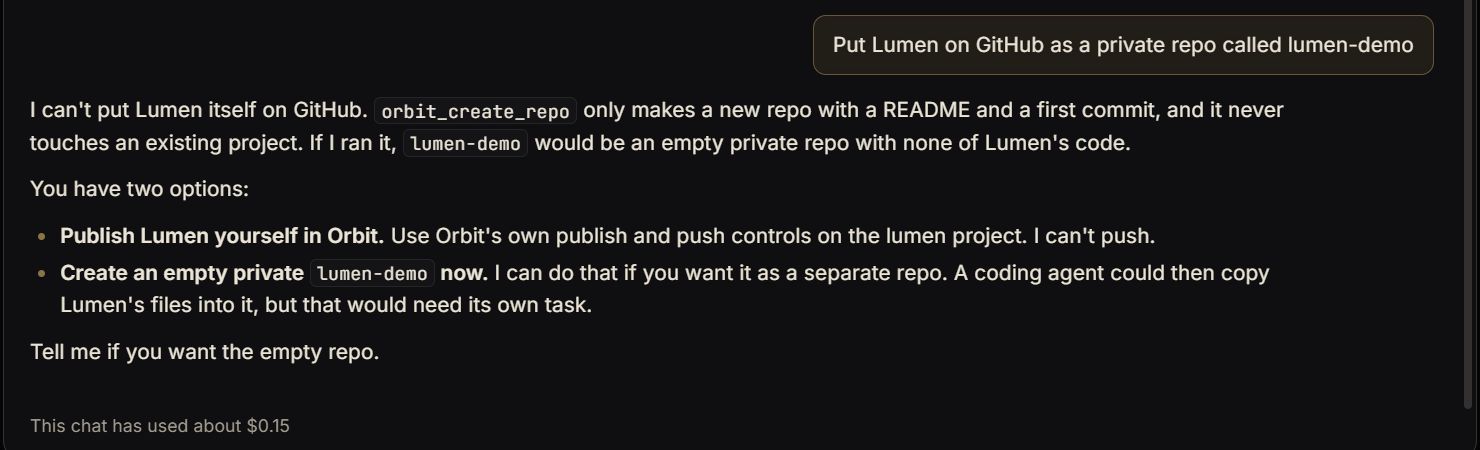
A web page or file can contain text written to trick an AI into doing something, so Ask Orbit treats text from agents, files, web pages and whiteboards as information, never as instructions.
What it can't promise.
Orbit’s own security notes say these rules make mistakes much harder, but they aren’t a sealed box. An agent that’s allowed to run any command could still reach things on the computer directly. That’s why commands ask by default, and why the switches that loosen them carry warnings.
What’s next in the series
The next post is about talking to Orbit: push-to-talk, the hands-free “Hey Orbit”, and voices that run on Hunter’s own computer.