 R7 Orbit



Ask Orbit is the assistant built into R7 Orbit. Hunter types or talks to it, and it runs the app for him: starting agents, switching projects, looking things up. In Coordinate mode he gives it a goal instead, and it plans the work, starts several agents after one approval, and reviews what they did. This sixth post in the series covers both modes and the limits built into it. Part 2 covers the wider rules that keep Hunter in charge.
What Ask Orbit is
Ask Orbit is a Claude conversation whose only tools are Orbit’s own. It can’t run commands, browse the web or write files the way a coding agent can. Everything it does goes through a fixed list of Orbit actions, like starting a task or switching canvas.
It arrived on October 1, 2026, and now sits as a tab next to the box where Hunter hands out work. Each project keeps its own conversation, and it’s still there after Orbit restarts. Every message also tells it which project and canvas Hunter is looking at, so “this” and “here” mean what he expects.
Operate: running the app for him
Operate mode does what it’s told. Some of the things Hunter can ask for:
- Start, compare or stop tasks, and say what’s waiting on him.
- Switch projects and canvases, tidy the view, fold finished cards away, or group cards into sections.
- Read and search files in his projects, so it can answer questions about the code. It never reads files that hold secrets, like keys or passwords.
- Create or clone a repository, open the built-in browser on a dev server, and, with his OK, look at the page and say what it sees.
- Draw a flow or a chart on a project’s whiteboard, or make a picture.
Anything that costs money, like starting agents, shows up as a card first with Approve and Decline. For the safer kinds there’s also “Allow, and don’t ask again”. Making a repository public or deleting one from his computer always asks, every time.
Coordinate: one goal, a plan of agents
Coordinate mode takes a goal rather than an instruction. Ask Orbit looks through the project, then breaks the goal into a few separate tasks, each with a prompt an agent could follow with no other context, and tries to keep them from editing the same files. Hunter sees the whole plan on one card and approves it once.
In the demo project used for Orbit’s video, a small habit tracker called Lumen, the goal was to get it ready for launch: a favicon and proper page titles, a habit list that works on phones, and a changelog. Ask Orbit listed the project’s tasks and files, read one, and proposed three Claude tasks.
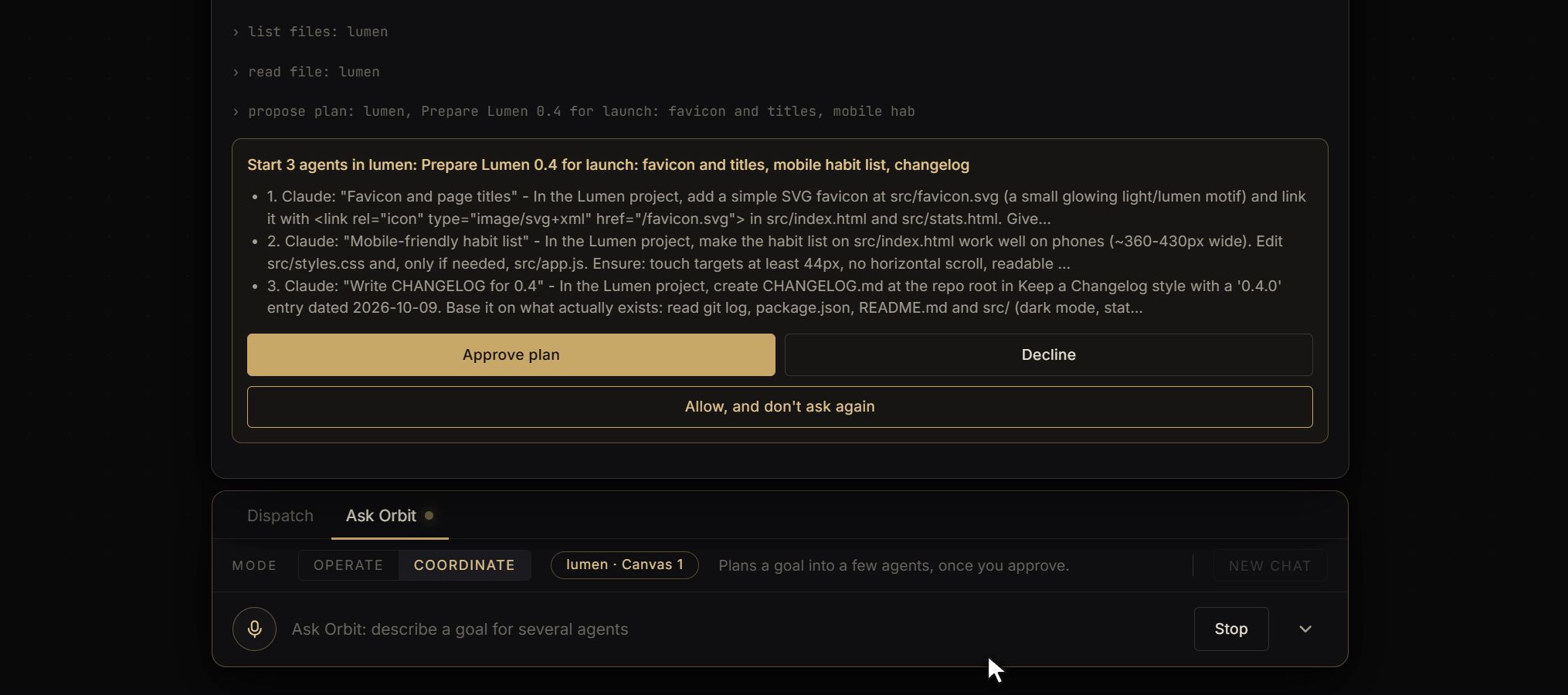
After the approval it starts the agents, waits for them, and reviews what each one changed. If something needs fixing, it can send that agent a follow-up, which asks Hunter first like any other spending. At the end it reports back, failures included.
What it can’t do
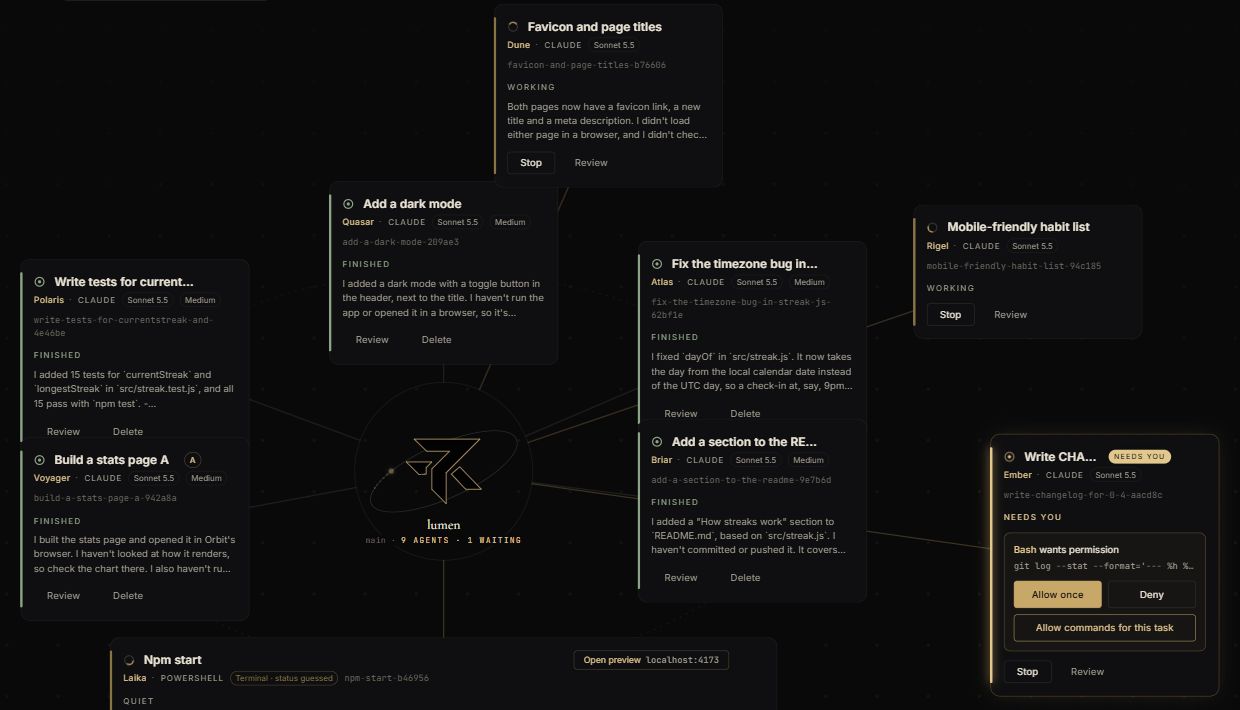
Ask Orbit can read what an agent is asking permission for, but it has no way to answer. In the demo, Ember’s question to run a command waited on its card for Hunter, even though Ask Orbit had started it. It also can’t push, merge or bring work into his project, type into a terminal, or click around in the browser.
It treats everything that comes from an agent, a file, a web page or a whiteboard as information, never as instructions. That way, text written to trick an AI into doing something can’t steer it.
Hunter can also reach it without typing. He can hold Ctrl+Space to talk to it, or say a whole message after “Hey Orbit”, and it picks out the jobs and starts a task for each (part 3 covers voice). Since October 24 he can attach pictures, PDFs and text files to it, and they stay with that project’s conversation until he starts a new chat.