 R7 Orbit
Hunter can run R7 Orbit by talking to it. He can hold a key and speak, or turn on “Hey Orbit” and talk to it hands-free, even with the window minimized. Orbit turns his speech into text on his own computer, and it can read answers back in a natural voice that also runs there. This third post in the series covers how that works and what changed along the way. Part 1 covers why Orbit exists, and part 2 how it keeps Hunter in charge.
Push-to-talk
Push-to-talk works like a walkie-talkie: hold a key while you speak, let go when you’re done. It arrived on October 1, 2026, the app’s second day. Hunter holds the mic button or Ctrl+Space and says things like “start a task to fix the login bug”, “what is waiting on me?” or “compare Claude and Codex on refactor the parser”.
The speech never leaves the computer. A small speech model, downloaded once after Hunter agreed, turns the recording into text right there, and the recording is never saved.
Later updates split it into three shortcuts, one for each place Hunter might talk:
- Ctrl+B types what he says into the box where he hands out work.
- Ctrl+Space talks to Ask Orbit, the assistant built into the app, and a gold glow runs round the window while it listens.
- Ctrl+K speaks into the task chat that’s open, or into a terminal.
Every agent also got a name that’s easy to say aloud, like Atlas, Briar, Polaris or Voyager, so “stop Atlas” works. Names that sound too much like another name were left out.
Read back before anything happens
Anything said that starts work, stops it or allows something is read back first, and nothing happens until Hunter says yes. Merging work into his project is never done by voice at all.
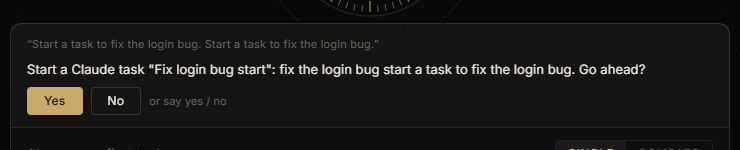
A sentence the built-in commands don’t recognize goes to Ask Orbit, which works out what was meant.
Voices that run on the PC
Orbit can also read answers aloud. The first version used the voices that come with Windows. Later that same day, October 1, natural voices arrived: 14 of them, American and British, with a speed setting. Like the speech model, they download once and then run entirely on Hunter’s computer, and speech starts as soon as the first sentence is ready instead of after the whole answer.
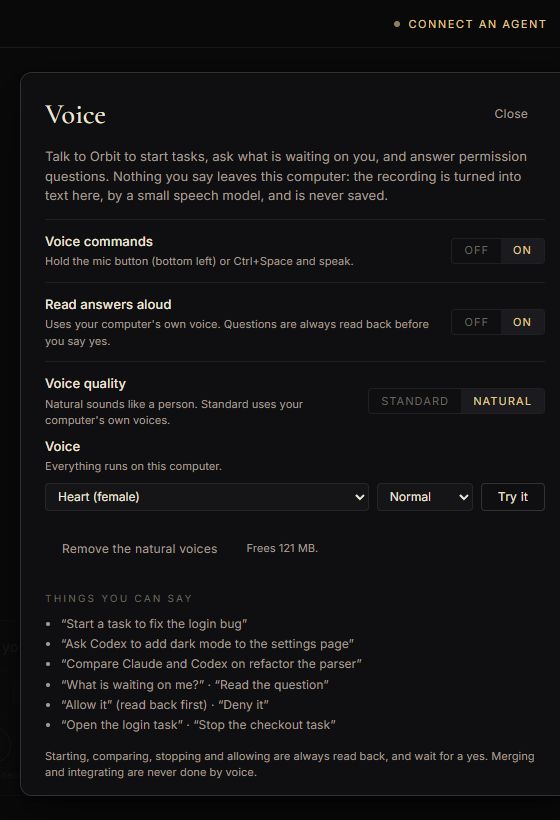
The automated test for those voices plays what a voice says to the speech model and checks that the model understands it, so one AI model grades the other’s pronunciation.
“Hey Orbit”
A wake word is a phrase an app listens for before it pays attention. Orbit’s is “Hey Orbit”, added on October 9. It’s off until Hunter turns it on. Then he can say “Hey Orbit, start a task to fix the login bug” while Orbit is minimized or behind another program, and a small window at the top of his screen shows what it heard and what it did.
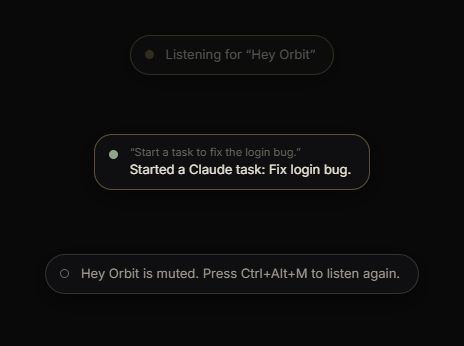
With “Hey Orbit” on, the microphone stays open, but Orbit only turns speech into text on the computer to listen for those words. Nothing is saved or sent. Commands said this way run straight away without a read-back, and Orbit says what it did. Merging is still never done by voice. For calls, Ctrl+Alt+M mutes it from any program, and Orbit lets go of the microphone completely.
Getting it fast took a change of speech model. The first one always worked on a 30-second clip, padding short ones out with silence, so even “Hey Orbit” took about three seconds. The new model’s work grows with how long the clip is, so a short phrase is quick.
Claude also tried a dedicated wake-word detector, a tiny program that only listens for one phrase. It was quicker and lighter, but it missed more often and struggled in a noisy room, so Orbit turns speech into text instead. A later update made it react while Hunter is still talking, and understand “Hey Orbit” said fast enough to come out as one word.
Saying a whole message
Short commands like “new canvas” or “allow it” run at once. Anything longer after “Hey Orbit” is treated as a message: Orbit keeps listening through pauses until Hunter says “that’s it” or “send it”, presses Send, or stays quiet for ten seconds. Ask Orbit then picks out the jobs in it and starts a task for each one. “Never mind” throws it away.
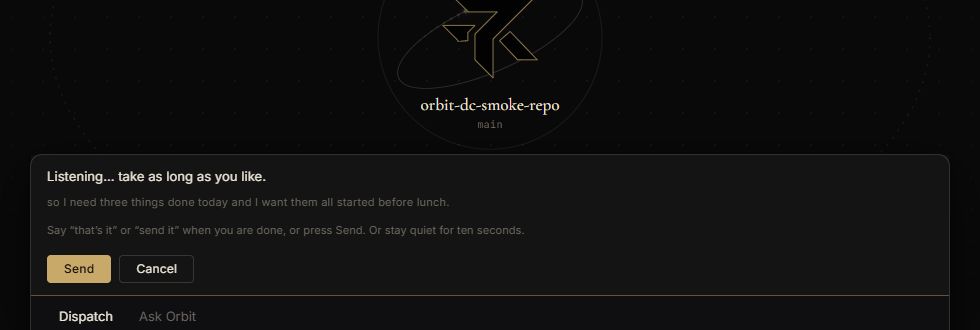
That’s what the R7 Orbit video shows: “Hey Orbit”, a pause, “start a task to add a weekly summary email”, “that’s it”, and a new agent at work. Holding a key to dictate used to stop at 30 seconds, mid-sentence if need be. Since October 23 it runs for up to 15 minutes, cut at Hunter’s pauses so long messages come out whole.
What’s next in the series
The next post is about what Hunter has built with Orbit: this website and the games on it.